Latest Version of ‘Virtual Desktop’ is Here, The Free App That Makes Your Entire Windows Computer Oculus Rift-capable
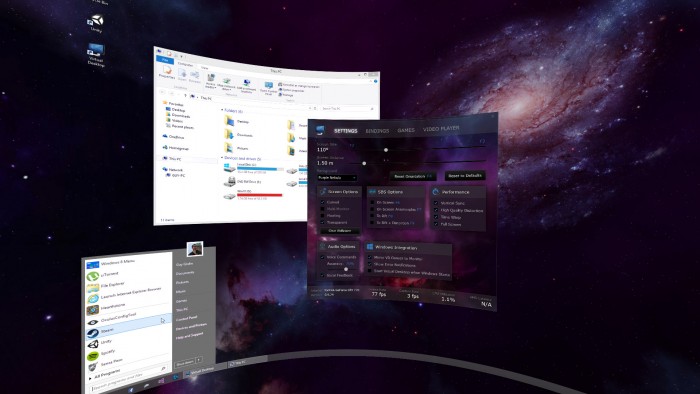 Virtual Desktop, a free app that instantly makes the entire Windows operating system VR-capable. Essentially anything that you can use on your monitor—whether it be Minecraft, Facebook, or Photoshop—you can use in VR with Virtual Desktop.
When you launch Virtual Desktop and don the Oculus Rift, you’ll be greeted with a curved, floating version of your familiar Windows desktop—wallpaper, icons, Start button and all—albeit surrounded by stars.
Given the relatively low resolution of the Oculus Rift DK2, some Windows programs will be more usable than others. Fortunately, Virtual Desktop makes it easy to change the field of view on the fly, allowing you to zoom in (F3) and out (F2) as needed. At 100 degrees right now I’m typing quite comfortably with text that’s easy to read. If I was watching Netflix however, I might dial it back to 80 degrees or so to ensure that I can see the whole screen.
Virtual Desktop also allows for easy viewing of side-by-side content (like 3D photos and videos) as well as spherical video in both 180 or 360 degrees, and optionally in 3D.
Virtual Desktop may still be in beta according to its developer, but it works surprisingly well. At the great price of free there’s no reason not to check it out.
See the full story here: http://www.roadtovr.com/the-latest-version-of-virtual-desktop-is-here-the-free-app-that-makes-your-entire-windows-computer-oculus-rift-capable/